

Network Requirements
This document describes the key requirements of the network environment for using the TrueSim Platform.
The Meta Quest 3 is a mixed reality headset developed by Meta. The section below describes the guidelines for setting up and configuring a network infrastructure to ensure optimal performance and connectivity for Meta Quest 3 users.
Wireless Connectivity
The Meta Quest 3 uses wireless connectivity for internet access and communication with other devices and services. It supports the following wireless standards:
- Wi-Fi: The Meta Quest 3 supports Wi-Fi 5 (802.11ac) and Wi-Fi 6 (802.11ax) for faster and more stable connections.
- Bluetooth: For connecting to Bluetooth devices such as controllers and other accessories.
Network Requirements
To ensure a stable, high-quality connection while using and casting the Meta Quest 3, the following network requirements must be observed:
1. Wi-Fi network: The Wi-Fi network must be compatible with the 802.11ac standard or higher. A 5 GHz network is strongly recommended for lower latency and higher throughput when casting MR imagery.
2. Bandwidth: The minimum recommended speed is 10 Mbps upload and download per device. For optimal performance, 25 Mbps or more per device is recommended.
3. Network latency: Low latency is essential for a smooth MR and casting experience. Aim for a network latency of less than 50 ms.
4. Security: Implement enterprise security protocols such as WPA2-Enterprise or WPA3 to protect sensitive data. Preferably use VLANs (Virtual LANs) to isolate VR traffic from other critical networks.
5. Network stability: Avoid interference by minimizing overlapping Wi-Fi channels and using professional-grade equipment that supports load balancing and Quality of Service (QoS). Consider using a mesh network system or additional access points to ensure stable coverage in larger or more complex buildings.
6. Access to required services: The Meta Quest 3 requires access to the following services for full functionality:
- Meta Casting Services: For streaming MR imagery to devices such as Chromecast or via a browser. Required addresses:
- https://oculus.com
- https://meta.com
- https://fbcdn.net
- Software update servers: To receive regular updates for the operating system and applications. Required addresses:
- https://secure.oculus.com
- https://graph.oculus.com
- https://akamaihd.net
- Cloud services: If used in combination with cloud storage or processing for training purposes.
- Meta Store: For downloading and managing applications (not required when using Quest for Business). Required address:
- https://www.meta.com/quest
Note: Always refer to Meta's most recent documentation and guidelines for specific recommendations regarding the network requirements for the Meta Quest 3.
Network Requirements; TrueSim LMS
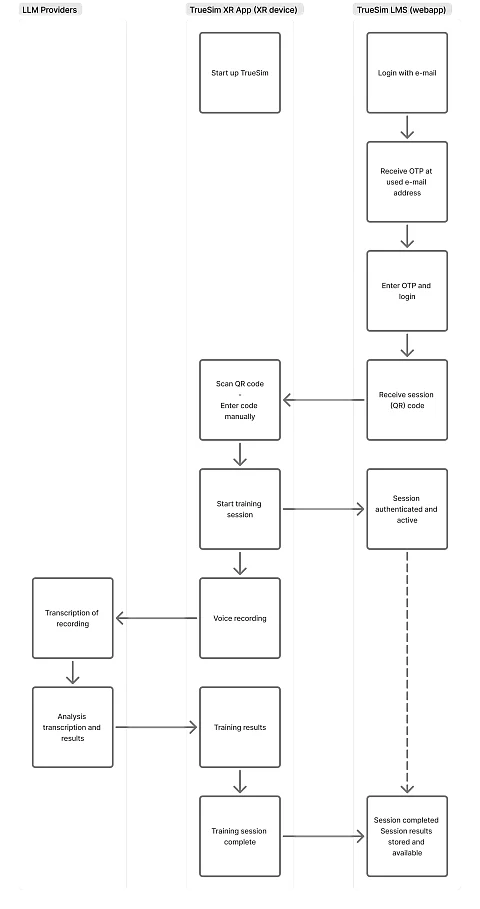
The actions performed by users of the TrueSim Simulation Trainings are monitored and presented as (training) results in a personal learning environment via our TrueSim LMS, available at https://train.truesim.com/.
After creating a TrueSim account, the user receives an email with instructions, including the corresponding username (email address) and a one-time, 6-character password. Once the user has logged in to our platform, they receive a training session code, which can be used in the XR app to start a personal training session.
After that, a realistic and interactive clinical case can be practiced with the simulation platform in mixed reality. While using the simulation platform on the mixed reality headset, other users (and/or an instructor) can observe via a (wireless) connection to a screen.
As a training is completed, the user's progress data is collected and processed. Users can track their own progress in the app. In addition, at the end the user receives feedback on which steps they performed correctly and which steps were missed, with tips for next time. This feedback is provided by the application.
A personal account also shows whether there is any improvement compared to the previous session. "Progress data" means: an overview of which clinical cases have been completed, how often they have been performed, and which feedback points the user received for them.
The TrueSim platform requires an internet connection for software maintenance, security upgrades, telemetry reporting, use of other cloud services, and remote technical support. The remaining sections of this document discuss the architecture, interfaces, and required access to the network's outbound ports needed to use the simulation platform.
Bandwidth
The devices on which TrueSim is used require a bandwidth capacity of at least 5 Mbps for the entire network used for simulations. During various phases of application execution, devices may generate traffic peaks of up to 14 Mbps.
Network Architecture
The figure below shows the architecture of a network that provides internet connectivity for using the TrueSim platform. The application requires access from the corporate network, via the internet, to the TrueSim LMS and third-party cloud services.